Client → Router → Worker
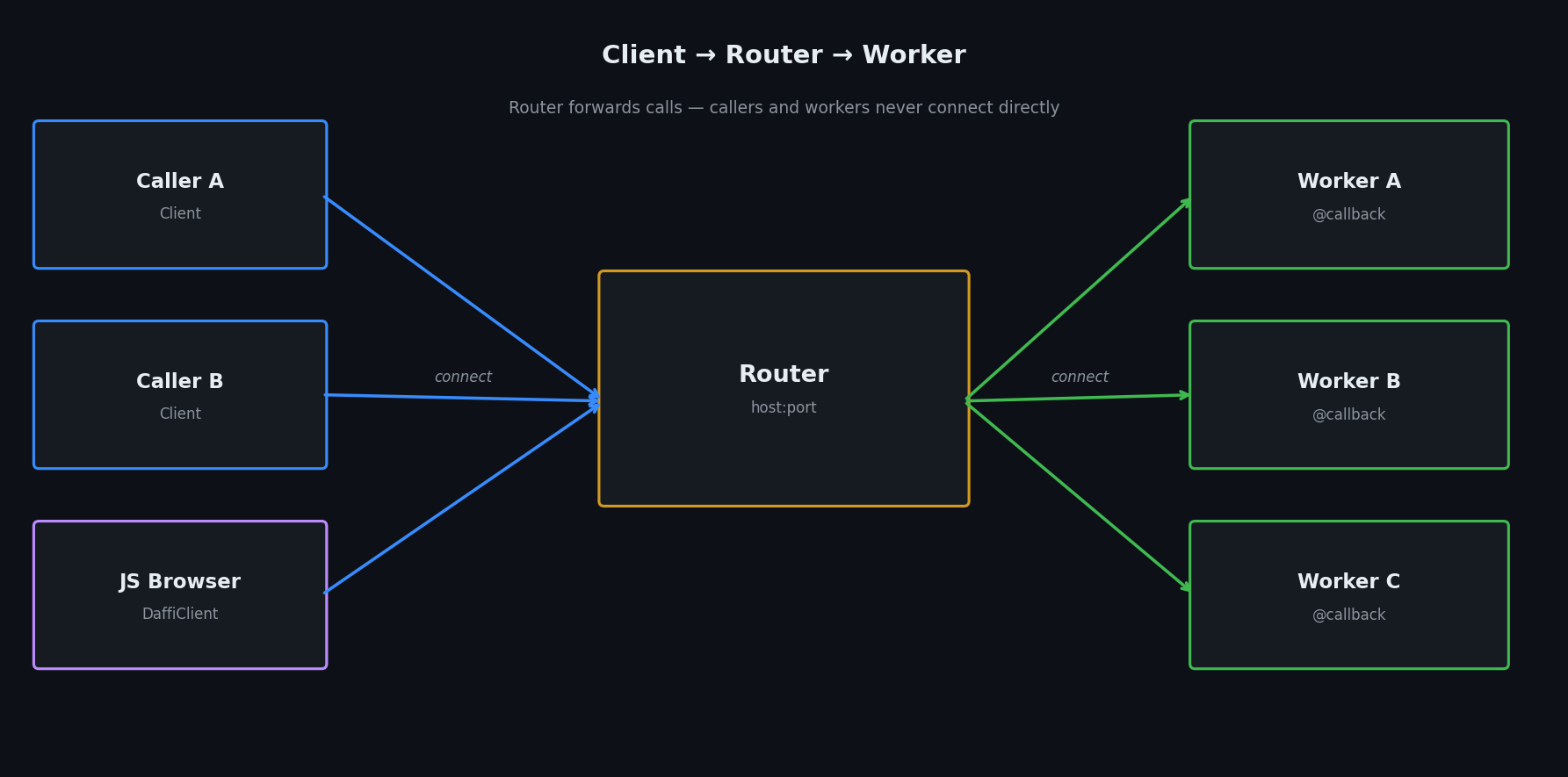
The Router topology decouples callers from workers. The Router is a pure message forwarder; Workers register their callbacks with it; Callers invoke those callbacks through it.
1. Start the Router
The Router has no callbacks of its own — it only forwards messages.
from daffi import Router

if __name__ == "__main__":
    router = Router(host="127.0.0.1", port=6001)
    router.start()
    print("Router running on 127.0.0.1:6001 — press Ctrl+C to stop.")
    router.join()
Router parameters
| Parameter | Type | Description |
|---|---|---|
host |
str |
TCP host to listen on. |
port |
int |
TCP port to listen on. |
tls |
bool |
Enable TLS (requires cert_file / key_file). |
2. Connect Workers
Workers are Clients that expose @callback functions.
Start as many instances as you need — the Router load-balances across them.
from daffi import Client, callback

@callback
def multiply(a: int, b: int) -> int:
    print(f"[worker] multiply({a}, {b})")
    return a * b

if __name__ == "__main__":
    worker = Client(app_name="calc-worker", host="127.0.0.1", port=6001)
    worker.connect()
    print("Worker connected — press Ctrl+C to stop.")
    worker.join()
Tip
Run two instances of this script in separate terminals.
rpc() will round-robin between them; cast() will call both.
Concurrent callbacks per worker node
Each worker Client accepts the same workers parameter as Service — it
controls how many callbacks a single worker node executes in parallel via
a thread pool:
| Parameter | Type | Default | Description |
|---|---|---|---|
workers |
int |
1 |
Concurrency level for callback execution within this node. |
I/O-bound callbacks (network, disk, database) — use a thread pool:
# Each worker node handles up to 8 callbacks concurrently via threads.
worker = Client(
    app_name="io-worker",
    host="127.0.0.1",
    port=6001,
    workers=8,
)
worker.connect()
worker.join()
CPU-bound callbacks (heavy computation, ML inference) — Python's GIL
limits true CPU parallelism inside a single process. Scale out by running
multiple worker nodes behind the Router (one per CPU core) rather than
increasing workers on a single node:
# Start N instances of this process — one per core.  The Router load-balances
# RPCs across them so all cores run callbacks in parallel.
worker = Client(
    app_name=f"cpu-worker-{os.getpid()}",
    host="127.0.0.1",
    port=6001,
    workers=1,
)
worker.connect()
worker.join()
See Service → Concurrent callback execution
for more on choosing a workers value.
3. Connect a Caller
Callers are also Clients — they just don't expose any @callback functions.
from daffi import Client

if __name__ == "__main__":
    caller = Client(app_name="calc-caller", host="127.0.0.1", port=6001)
    conn = caller.connect()

    # Round-robin — any available worker handles this call.
    result = conn.rpc(timeout=5).multiply(6, 7)
    print(f"multiply(6, 7) = {result}")   # → 42

    # Pin to a specific worker by name.
    result = conn.rpc(timeout=5, receiver="calc-worker").multiply(3, 3)
    print(f"multiply(3, 3) [pinned] = {result}")   # → 9

    caller.stop()
Bidirectional communication
Because every Client can both expose callbacks and call remote ones, bidirectional communication is natural: two nodes connect to the same Router and call each other.
# node_a.py
from daffi import Client, callback

@callback
def hello_from_a(msg: str) -> str:
    return f"A received: {msg}"

node_a = Client(app_name="node-A", host="127.0.0.1", port=6003)
conn = node_a.connect()

# Call node-B's callback
reply = conn.rpc(timeout=5, receiver="node-B").hello_from_b("hi from A")
print(reply)
# node_b.py
from daffi import Client, callback

@callback
def hello_from_b(msg: str) -> str:
    return f"B received: {msg}"

node_b = Client(app_name="node-B", host="127.0.0.1", port=6003)
conn = node_b.connect()
node_b.join()
cast() via Router
cast() fans out to every worker that exposes the requested function and collects all results.
conn = caller.connect()

# Call all workers — returns {"worker-1": result, "worker-2": result, ...}
results = conn.cast(timeout=5).process("task-A")
print(results)

# Restrict broadcast to a subset of workers.
results = conn.cast(timeout=5, receiver=["worker-1"]).process("task-B")

# Fire-and-forget broadcast.
conn.cast_nowait().process("task-C")
Waiting for members
In a multi-worker environment the caller often starts before all workers are
online. Instead of adding time.sleep() calls or wrapping every RPC in a
try/except retry loop, use conn.wait_for_members() to block until the
required peers appear in the Router's member registry:
from daffi import Client

if __name__ == "__main__":
    caller = Client(app_name="calc-caller", host="127.0.0.1", port=6001)
    conn = caller.connect()

    # Block until both workers have registered — start order doesn't matter.
    conn.wait_for_members("worker-1", "worker-2")

    # Safe to call now — both peers are guaranteed to be online.
    results = conn.cast(timeout=10).process("task")
    print(results)

    caller.stop()
The method polls the native ChannelsMapper every interval seconds (default
1.0 s) and returns as soon as all listed names appear. An optional
timeout parameter raises TimeoutError if the deadline is exceeded:
from daffi import Client

conn = Client(app_name="caller", host="127.0.0.1", port=6001).connect()

# Raise TimeoutError after 30 s if the worker hasn't joined yet.
conn.wait_for_members("slow-worker", timeout=30)

# Change the poll interval.
conn.wait_for_members("worker-1", "worker-2", interval=0.5)
| Parameter | Type | Default | Description |
|---|---|---|---|
*members |
str |
— | One or more peer names to wait for. |
timeout |
float \| None |
None |
Max seconds to wait. None = wait forever. |
interval |
float |
1.0 |
Poll interval in seconds. |
Examples
| Example | Location |
|---|---|
| Basic rpc via router | examples/router/01_rpc/ |
| cast / cast_nowait via router | examples/router/02_cast/ |
| Bidirectional communication | examples/router/03_bidirectional/ |
| Pickle serde | examples/router/04_serde_pickle/ |
| JSON serde | examples/router/05_serde_json/ |
| OPAQUE serde | examples/router/06_serde_opaque/ |
| MSGPACK serde | examples/router/07_serde_msgpack/ |
| Events via router | examples/router/08_events/ |
| Waiting for members | examples/router/09_wait_for_members/ |